How to build an AI voice assistant with Mapbox navigation
Let agents operate navigation built into your iOS and Android apps.
Today, Mapbox is releasing 30 Agent Tools for Navigation that let an AI agent control the Mapbox Navigation SDK in iOS and Android apps for mobile and automotive. The release also includes an example voice assistant app built with the new tools and OpenAI’s GPT-Live full-duplex voice model. A driver says “I need a coffee before work” - the agent looks up a coffee shop on the way, adds it to the trip, and updates the ETA while the driver keeps their eyes on the road and hands on the wheel.
Quickstart:
- Install the Mapbox Plugin in Claude Code or OpenAI Codex
- Run the prompt below, and follow instructions:
Clone https://github.com/mapbox/mapbox-navigation-agent-sample, follow AGENTS.md, and get the Android sample app running.
What the Mapbox tools do
Mapbox Agent Tools for Navigation give the model clear instructions for one navigation job, including which steps to run and in what order. Some jobs are simple, like looking up an arrival time or dropping a pin on a search result. Others take several steps, like reordering stops mid-trip or finding gas stations along the route. These more complex tools allow a wide variety of user-facing functionality, including:
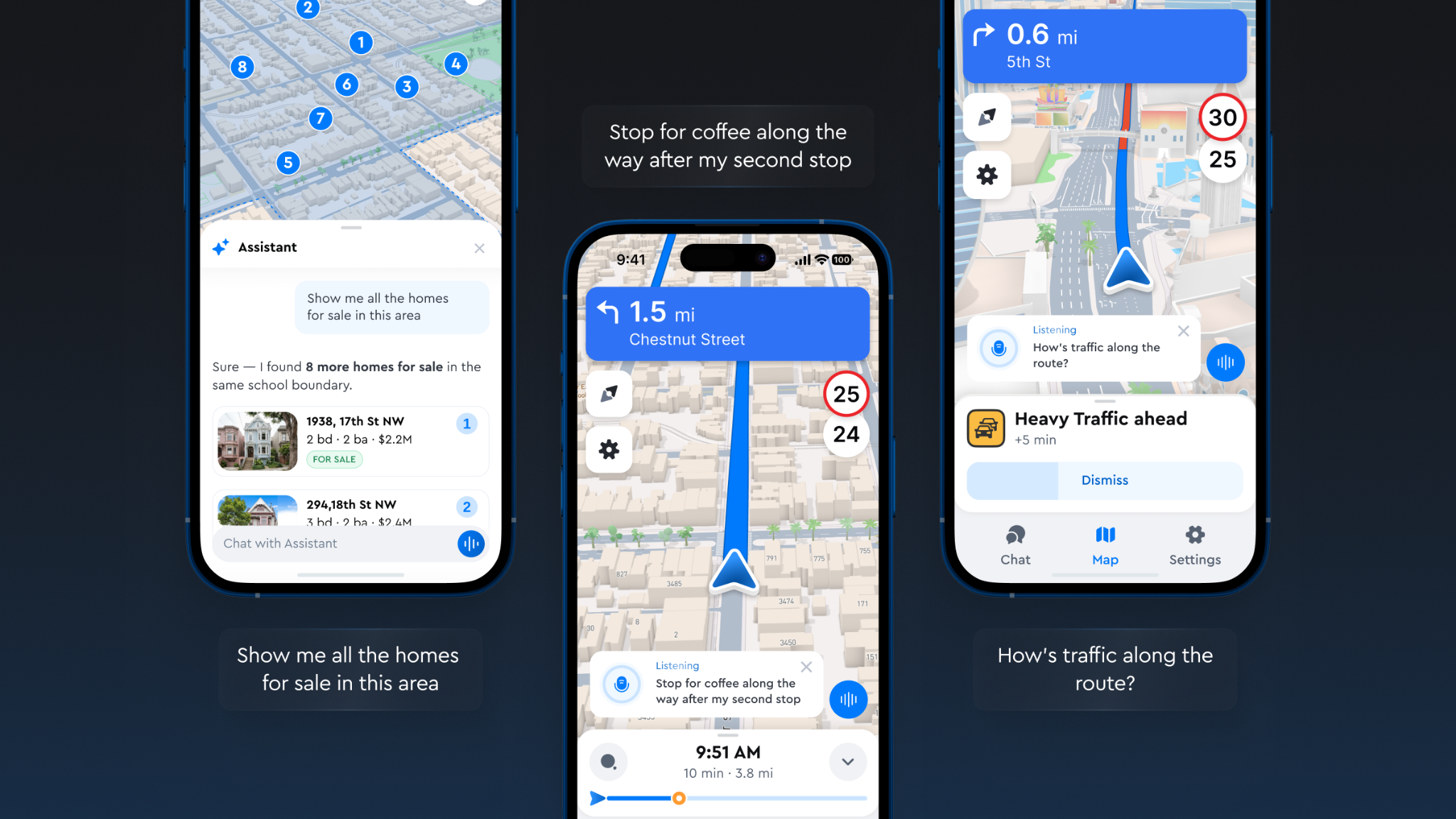
- Control the map. "Show me homes for sale near a park." A real estate app combines its own listings with Mapbox navigation tools to filter, mark, and frame the results.
- Start and stop navigation. "Take me to the nearest authorized service center." An e-bike companion app finds the closest shop and starts guidance.
- Change the route mid-trip. "My next pickup was cancelled. Skip it and avoid highways." A delivery app removes the stop and reroutes.
- Search along the way. "Find a coffee shop after school drop-off." The agentic voice assistant searches near that stop and adds the best match to the route.
- Answer questions about the trip. "How's traffic ahead? When will I get there?" The answer comes from the live route state.
Providing well defined tools significantly reduces common mistakes made by LLMs, such as accidentally removing the wrong stop.
An agentic voice assistant can chain several tools for one request. It can also use them alongside tools that developers write for their own data, such as business listings or vehicle status like charge levels.
How it works
Everything except the LLM runs inside of the app. The model decides which tools to use, and the Mapbox Navigation SDK on the device carries out the work.
For example, here is one request, from start to finish:
- A driver asks. "Find a coffee shop near the office and add it as a stop."
- The model picks the tools. It reads each tool's description and chooses
search_near_destination, thenadd_waypoint. - The tools execute the steps. Each tool runs the Navigation SDK calls that job requires, on the device.
- The results go back to the model. The new stop and the updated arrival time come from the live route state.
- The model replies. It confirms the stop and the new arrival time out loud.
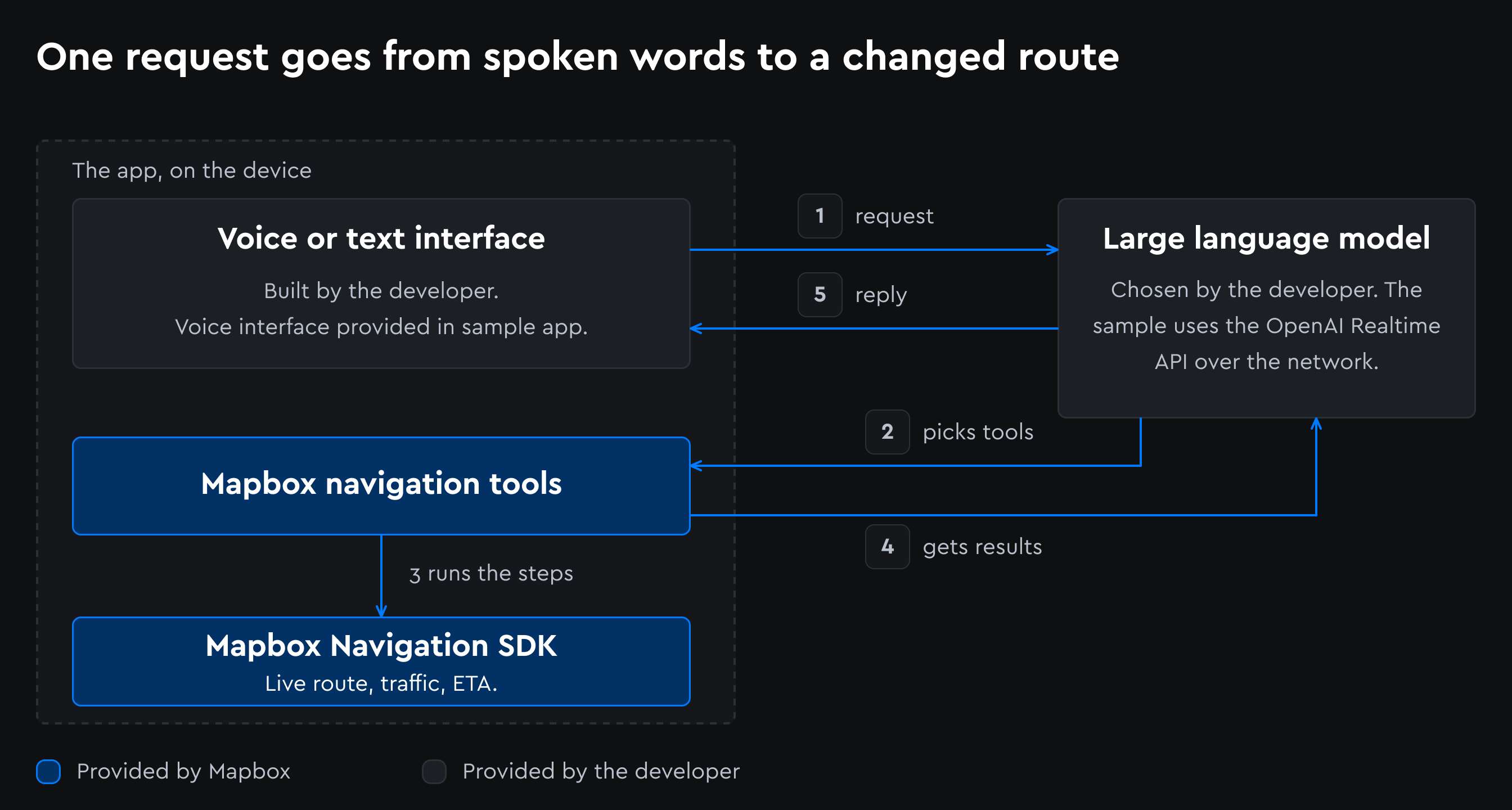
The model does not get direct access to the Navigation SDK. It can only call the tools that the developer includes in their app, and each tool does what a driver would do by tapping: add a stop, reroute, or search along the route.
Get started
Developers and coding agents can find setup instructions and a quick-start guide for the Android sample app, iOS sample app, and 30 navigation tools in the README.md AGENTS.md files.
Run the sample app
- Download the Android app from the releases page
- Enter a Mapbox access token and an OpenAI API key in the app settings.
- Tap the microphone, ask for a route, then ask for a coffee stop on the way.
To build the sample app from source on Android or iOS, follow the quickstart in the README.
Add the tools to an existing app
- Add the tools to a project that already uses the Mapbox Navigation SDK.
- Give the tool definitions to the model, along with any tools written for the app's own data.
- When the model asks to run a tool, pass that request to the tools library. The library runs the steps on the Navigation SDK.
- Send the result back to the model, which replies to the rider or driver, or picks the next tool.
The sample app takes spoken requests, but the tools don't depend on voice. The README explains how to accept typed requests and how to connect a different model.
Start with a coding agent
The README and AGENTS.md are written so a coding agent can go from clone to a running app. Developers can start with a prompt like this:
Clone https://github.com/mapbox/mapbox-navigation-agent-sample, follow AGENTS.md, and get the Android sample app running.
To bring the tools into an existing app:
Using https://github.com/mapbox/mapbox-navigation-agent-sample as a reference, add the Mapbox navigation tools to my app and connect them to my model.
Share your experience
This release is experimental sample code, and the tool definitions will change. Mapbox is sharing it early so developers can help shape what the tools do next and which use cases they cover. Try the sample app and tools, then let us know what worked, what broke, and what's missing. Drop us a line at ai-voice-tools@mapbox.com.


Related blog posts
Introducing the Mapbox plugin for ChatGPT

How Athenium and Cecilian Partners build AI-powered applications with Mapbox

New Mapbox CLI for coding agents
Ready to get started?
Create an account or talk to one of our experts.